It publishes what is committed
The published site comes from the repository, not from the machine's scratch directory. What is online is a version you can point at in the history.
Publishing
No pipeline to configure, no hosting account to open, no deploy command to learn. One click and your site is live at your‑name.thxamelia.com — free, on every plan, with HTTPS — and it stays up as long as your plan does.
One click takes what is committed in your repo and serves it at a real URL with a certificate. On the free trial it is a seven‑day preview on our subdomain; publish again on a plan and the same address comes back.
Publish it.
HTTPS · live immediatelypublished · free, every plan
What happens
The published site comes from the repository, not from the machine's scratch directory. What is online is a version you can point at in the history.
Every project gets its own address with a certificate, ready to send to a client before you have decided on a domain name.
Point a domain you already own at it and the same build answers there. See custom domains.
What happens, in order:
Step 2 is the one that matters later: what is online is a version you can point at in your own git history, not whatever happened to be on a machine that no longer exists.
A deliberate choice
Sites are served from thxamelia.com — a separate registrable domain, never a subdomain of this one. What gets published is JavaScript an agent wrote for a stranger, and on a shared domain that code would run beside the origin holding your signed-in session. Keeping them apart means one customer's build cannot reach another customer's account, whatever it contains.
The same reasoning splits publishing across two services: the one that decides whether you may publish is not the one with write access to the directory the public internet is served from.
Nothing an agent wrote is ever served from this name.
Agent-written JavaScript runs here, where the browser's own rules stop it reaching anything above.
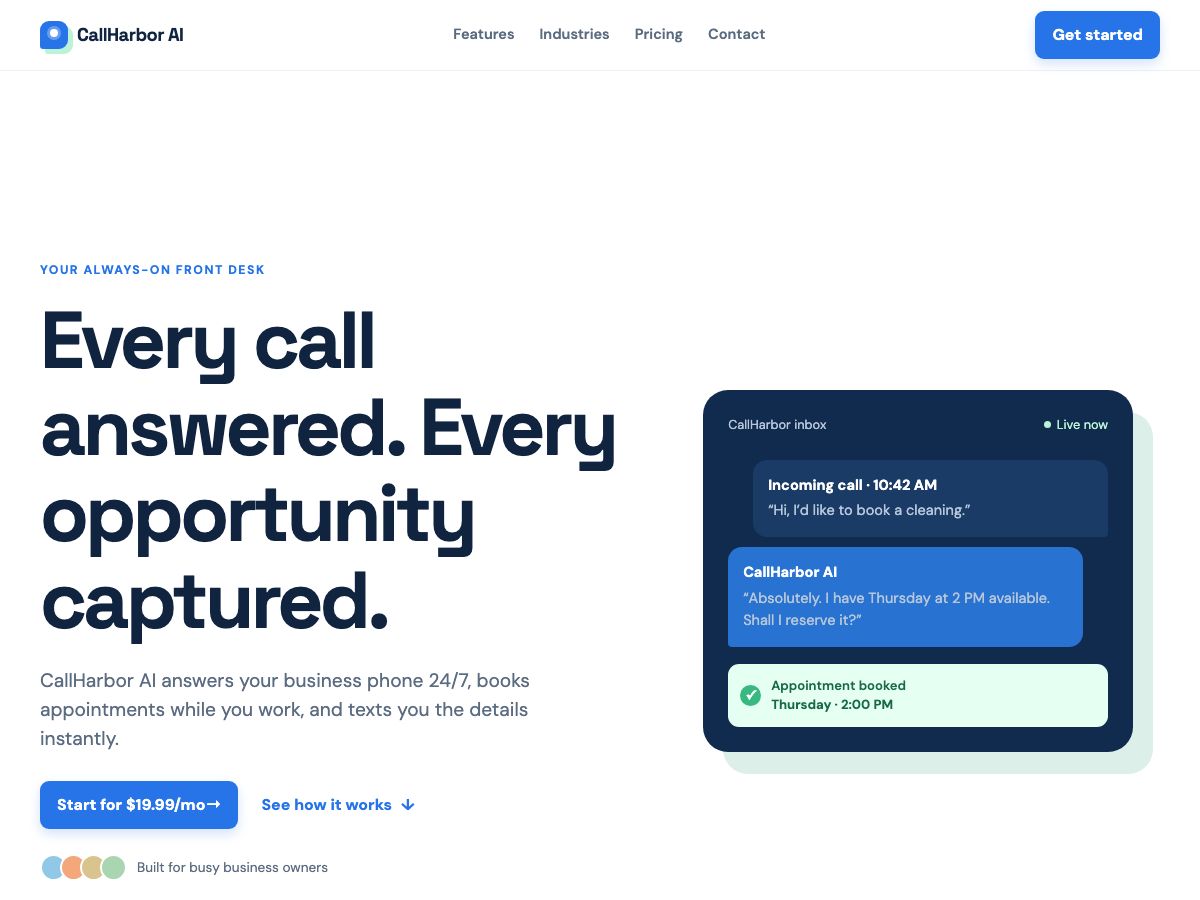 A real one
Published the same way, every time.
“Build a landing page for an AI phone answering service for small businesses. It picks up every call 24/7, books appointments and texts the owner the details. Starts at $19.99 a month. Include a nav bar with Features, Industries, Pricing and Contact that jumps to those sections, and make the sign-up the obvious next step.”
GPT-5.6 Luna1 turn56s
$0.0096
See all 53 builds →
A real one
Published the same way, every time.
“Build a landing page for an AI phone answering service for small businesses. It picks up every call 24/7, books appointments and texts the owner the details. Starts at $19.99 a month. Include a nav bar with Features, Industries, Pricing and Contact that jumps to those sections, and make the sign-up the obvious next step.”
GPT-5.6 Luna1 turn56s
$0.0096
See all 53 builds →
From a sentence to a live URL, without learning a deploy step.
Questions
Press publish. What is committed in your repository is served at a real URL with a certificate, with nothing to configure first.
Yes. It is a normal git repository, so you can point Vercel, Netlify or your own server at it instead.
Published pages are code an agent wrote. Serving them on a subdomain of the site holding your signed-in session would let one reach the other.